



Download Context Menu Switcher for Windows 11 – Windows 11, context menu switcher, Windows 10 menu, right-click menu, productivity tool, utility app, desktop customization, system enhancement
Overview
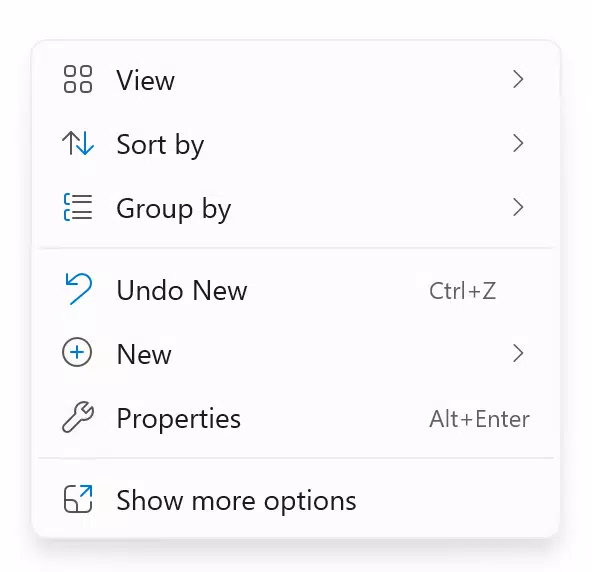
Context Menu Switcher for Windows 11 is a specialized utility designed to address a common user frustration: the transition from the familiar Windows 10 context menu to the more minimalist, streamlined interface introduced in Windows 11. This tool allows users to toggle between the modern Windows 11 context menu and the full-featured Windows 10 version with ease. For individuals who value functionality over aesthetics or prefer the comprehensive options available in the older menu, this app offers a practical solution to maintain workflow efficiency without compromising on system design.
Target users include power users, professionals, and anyone who frequently uses right-click menus for file management, system navigation, or software operations. The app is particularly beneficial for those who find the reduced feature set in the Windows 11 context menu limiting. By enabling users to switch between interfaces, it bridges a gap in user experience, offering a hybrid approach that combines modern design with legacy functionality. The developer, Eddie C. Reardon, has created a focused tool that solves a specific problem with precision, making it a valuable addition to the Windows 11 ecosystem.
Although the developer did not provide additional technical details, the app’s purpose is clearly defined: to restore flexibility to a system feature that was otherwise locked into a single design. Its real-world use cases include quick access to advanced file operations, registry edits, or third-party software integration—all of which may be less accessible in the simplified Windows 11 menu. In an environment where customization is increasingly valued, Context Menu Switcher stands out as a lightweight, purpose-built utility that enhances system usability without adding bloat.
Key Features & Functionality
- Seamless Menu Switching – Users can toggle between the Windows 11 and Windows 10 context menus with minimal effort. This feature allows for immediate adaptation to personal workflow preferences, whether prioritizing design or functionality.
- Intuitive User Interface – The application is designed with simplicity in mind. A clean layout ensures that even non-technical users can navigate the tool without confusion or learning curves.
- Personalized Desktop Experience – By offering the ability to choose between two distinct menu styles, the app supports a tailored user environment, accommodating diverse user habits and operational needs.
- Productivity Enhancement – With quick access to essential functions previously buried or removed in the Windows 11 interface, users can perform tasks faster and with fewer clicks.
- Native Windows 11 Integration – Built specifically for Windows 11, the app ensures compatibility and stability within the operating system, avoiding conflicts with system processes.
For example, a graphic designer using file-heavy workflows might prefer the Windows 10 menu for its expanded options when right-clicking on project files. With Context Menu Switcher, they can switch to that menu instantly, improving file organization and batch processing. Similarly, IT professionals managing system settings may find the classic menu more intuitive for accessing advanced tools. The app enables these users to maintain productivity without switching operating systems or installing third-party replacements.
Interface, UX & Performance
The user interface of Context Menu Switcher is described as user-friendly and intuitive, aligning with its goal of accessibility. The layout appears minimalistic, focusing on core functionality without unnecessary distractions. Navigation is straightforward, likely relying on a single control or toggle to switch between context menu styles. This simplicity reduces cognitive load and supports efficient interaction.
Although the developer did not list formal performance metrics, the app’s lightweight size of 2.1 MB suggests it consumes minimal system resources. It is expected to run efficiently on a wide range of Windows 11 devices, from entry-level laptops to high-end desktops. Responsiveness is likely consistent, as the tool operates at a system level without requiring heavy processing power.
Stability is a key concern for utilities that modify system behavior. Given the app’s focus on a single function and its small footprint, it is reasonable to assume it maintains a stable presence in the background. However, specific compatibility details or known issues were not disclosed. Users should expect a smooth experience under normal conditions, but any unexpected behavior should be reported to the developer for future updates.
Platform Compatibility & Technical Requirements
Context Menu Switcher for Windows 11 is designed exclusively for the Windows 11 operating system. It is compatible with devices running Windows 11, though specific version requirements were not listed. The application has a file size of 2.1 MB, indicating a lightweight installation that does not strain storage or memory.
The developer did not specify minimum OS requirements, so users should ensure their system is running a stable build of Windows 11. Compatibility with older Windows versions or other platforms was not mentioned. The app is available at no cost, making it accessible to a broad audience seeking a simple, no-frills solution.
Since no additional technical details were provided, users are advised to install the app through trusted sources to ensure integrity. The absence of complex dependencies or background services suggests a low risk of conflicts with other software.
Pros and Cons
Pros
- Effortless switching between Windows 11 and Windows 10 context menus
- Lightweight design with minimal system impact
- Intuitive interface suitable for all user skill levels
- Free to download and use
- Specifically built for Windows 11, ensuring native compatibility
Cons
- Specific system requirements were not disclosed
- No information on update frequency or developer support channels
- Only available for Windows 11, limiting cross-platform use
- Functionality is limited to context menu switching, with no additional features
- Compatibility with future Windows 11 updates is not confirmed
FAQ
Is Context Menu Switcher safe to install?
The app is free and designed for Windows 11. While the developer did not provide a digital signature or detailed security documentation, it is recommended to download the tool from official or verified sources to ensure authenticity and avoid tampering.
Can I use this app on Windows 10?
Based on the provided information, the app is built specifically for Windows 11. Compatibility with Windows 10 was not confirmed, and the developer did not list support for older operating systems.
Does the app require administrator privileges?
Specific permission requirements were not disclosed. However, since it modifies system-level context menu behavior, it may require elevated access during installation or operation.
How often is the app updated?
The developer did not specify an update schedule. Users should monitor the official source for new releases, especially in response to future Windows 11 updates.
Is the app available on mobile platforms?
Context Menu Switcher is a desktop utility for Windows 11. There is no indication that a mobile version exists or is planned.
Final Thoughts
Context Menu Switcher for Windows 11 delivers a focused, effective solution to a niche but meaningful user pain point. For those who miss the expanded functionality of the Windows 10 context menu, this app provides a simple, reliable way to regain control without altering the core system. Its lightweight nature, free pricing, and intuitive design make it a compelling choice for users who value both modern aesthetics and practical utility.
While it lacks advanced features or cross-platform availability, its singular purpose is executed well. It’s ideal for professionals, power users, and anyone who relies heavily on right-click menus for daily tasks. The app enhances productivity by restoring flexibility to a system feature that was otherwise restricted.
Download Context Menu Switcher now


